Turn yourself into a video game character.
Upload one photo and get a recognizable 4-direction walk-cycle sprite of you — a 4×4 sheet, 16 transparent frames, and looping walk GIFs that drop into Godot, Unity, or the web. Not a filter or a profile picture: a character you can actually move. $5, no subscription.
To turn yourself into a video game character, upload one photo of yourself to PixelForge and you get a recognizable 4-direction RPG walk-cycle sprite — a top-down character that walks up, down, left, and right, the way a hero moves in a classic 2D game. It is not a face filter or an avatar picture. The output is a real, animated character you can drop into a game engine and walk around. It costs a one-time $5, with no subscription.
Your photo, walking in a game
Upload a portrait on the left, get the character on the right. PixelForge keeps the cues that make you you at sprite size — hair, glasses, shirt color, body shape — so a friend can spot which character is you without being told.
 → you, walking
A filter gives you a picture. This gives you a character.
Plenty of apps turn a selfie into a pixel-art portrait, a PS2 avatar, or a stylized headshot. Those are great if you want a profile picture — but they hand back a single still image. PixelForge hands back a playable character: the same person, drawn from four angles, animated walking, sliced into engine-ready files.
| PixelForge | Filter / avatar / PFP apps | |
|---|---|---|
| You get | a character that walks 4 ways | one static image |
| Angles | down, left, right, up | one pose, front-on |
| Animated | 4 looping walk cycles | no — it's a frame |
| Use it to | play as yourself in a game | set a profile picture |
| Files | transparent PNG sheet + frames | a flat JPG/PNG |
How to turn yourself into a character
Upload your photo
One clear, front-facing shot of just you. HEIC is fine; no-face and group photos are rejected before payment.
We forge + QA it
An AI model draws the 4×4 sheet from your photo; deterministic code cuts out the background and aligns the feet.
Play as you
Download the ZIP and drop the sheet into Godot, Unity, Phaser, or the web. Walk around as yourself.
Not just you — your whole crew
One photo each turns anyone into a matching playable character: you, a friend, a teammate, your favorite streamer. Run them one at a time and you've got a full party that all reads in the same RPG style.
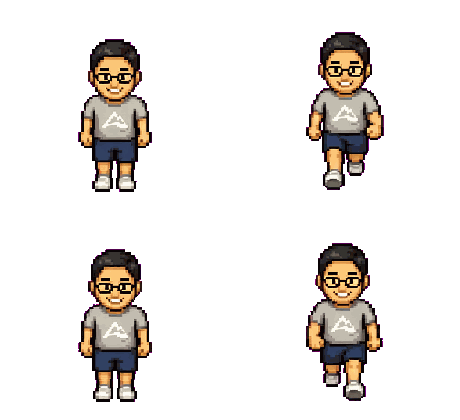
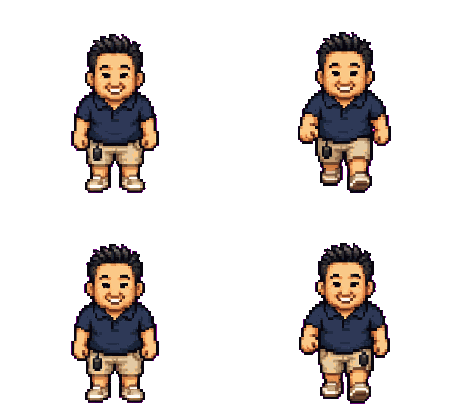

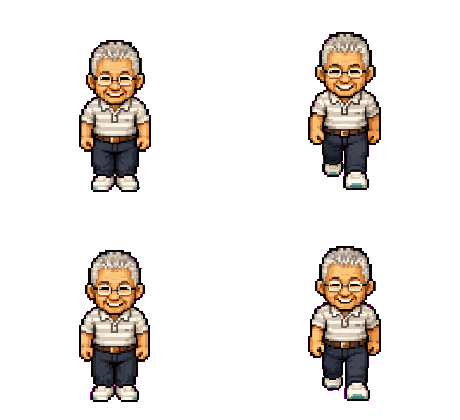
Four real packs, four real photos — the founder sprited his own family first. Yours works the same way: one photo per person, one matching character each.
What's in your $5 character pack
One character, done well: a 4-direction walk cycle. PixelForge doesn't do idle, attack, jump, items, or other animations — just a clean walk pack that looks like you.
Frequently asked questions
That's the whole goal. PixelForge starts from your real photo and keeps what reads at sprite size — hair, glasses, facial hair, shirt color, and body shape — so people can recognize which character is you. It's a stylized RPG sprite, not a photo-perfect portrait, but it's clearly you.
Yes — run one photo at a time and each person becomes a matching playable character in the same style, so you can build a whole party. Each character is a separate $5 forge.
Honestly, it's tuned for people. PixelForge can only work from a clear, single, front-facing face, so a pet with an obvious face might come through — but it's not what the model is built for, and animals are hit or miss. For a reliable result, use a photo of a person.
Yes — the pack is yours to ship in commercial and non-commercial games, with no per-title or royalty fees. See the commercial use & licensing page for the details.
One clear, front-facing photo of a single person, well-lit, with your face and upper body visible. Avoid group shots, sunglasses, tiny distant people, and heavy blur. iPhone HEIC files are accepted, and the checker rejects no-face and multi-face photos before you pay.
$5 per character, one-time. No account or subscription, you get 3 free retries if the first pass doesn't look like you, and you're refunded if a pack fails QA (handled manually during beta).
Put anyone into your game.
$5 · one photo · 4-direction walk pack · no subscription
Make a sprite — $5