Sprites for vibe-coded games.
You vibe-coded the whole game in Cursor, Claude, Lovable, or bolt — then hit the one wall the AI can't clear: a usable character. PixelForge turns a photo into a recognizable 4-direction walk pack. Generated by AI, finished by code. $5, one-time.
The wall every vibe-coded game hits
The loop is the same every time. The AI scaffolds your movement, your camera, your collision, your whole game — and then you ask it for the player character. What comes back is a high-res picture pretending to be a sprite: a fake checkerboard that isn't actually transparent, drifting pixels, feet that float, and four "directions" that look like four different people. Ask for a walk cycle and each frame is a fresh roll of the dice — consistency between frames is pure luck. The model gets you a rough draft; you still need someone to finish it.
That "someone" is the gap PixelForge fills. You bring a photo of a real person — you, a friend, your protagonist's face — and you get back a recognizable 4-direction walk pack that drops straight into the game you already built.
Generated by AI, finished by code
This is the part text-prompt tools skip. An AI model paints the 4×4 sheet; then deterministic code does the finishing — the work that turns a pretty image into a real game asset. No vibes in this step, just pixels in the right place.
- Background truly removed — real alpha, not a painted-on checkerboard that ships as a grey box in your engine.
- Feet aligned to a baseline — every frame stands on the same line, so your character doesn't bob or sink as it walks.
- Frames trued + sliced — 16 frames on a consistent grid, cut into clean PNGs and strips instead of one fused image you have to chop up by hand.
- QA before it ships — packs are checked during beta, and you're refunded if one fails. The point is a character that looks intentional, not generated.
That's the difference between "AI slop" and an asset: not the model, the finishing.
From a face to a playable character
 → your character
It's a real person in, a recognizable character out — not a stranger a prompt happened to describe. PixelForge keeps the cues that read at 48 pixels (hair, glasses, shirt color, build) so the hero of your game is unmistakably that person.
How to get a character for your AI-built game
Upload one photo
A clear, front-facing portrait of a single person. HEIC is fine; no-face and multi-face shots are rejected before you pay.
Pay $5 — no account
One-time $5 through Stripe. No sign-up, no subscription, no credits to ration.
Drop the ZIP in your engine
Unzip and wire it up. Engine-agnostic files for Godot, Unity, Phaser, or plain web — the same loop you've been building in.
Text prompt vs. your photo
Most "AI sprite" tools start from a sentence and hand back a stranger — or a raw sheet you still have to clean. PixelForge starts from a face and hands back a finished walk pack.
| PixelForge | Text-prompt sprite tools | |
|---|---|---|
| Starts from | your real photo | a text prompt (a stranger) |
| Looks like | a recognizable person | whatever the model imagined |
| Finishing | code: alpha, feet, frames trued | raw model output, DIY cleanup |
| Output | 4-direction walk pack, sliced | often one frame or a fused sheet |
| Pricing | one-time $5, no account | credits / monthly plans |
Honest scope: PixelForge makes one playable character per photo — a 4-direction walk pack. It doesn't generate tilesets, items, UI, or your whole game's art. It does the character your AI build couldn't, and does it well.
The prompt that wires it up — copy, paste, done
You vibe-code; here's the hand-off. After you drop the ZIP into your project, paste this into Cursor, Claude, or whatever's building your game, and it will write the loader and animation code correctly on the first try:
Paste to your AI builder ↓
The player sprite is in assets/. sprite-sheet-96-transparent.png is a
4×4 grid of 96px cells (a 48px sheet also exists). Rows top-to-bottom:
walk-down, walk-left, walk-right, walk-up. Columns: neutral, left-step,
neutral, right-step. Loose frames: frames96/<dir>/<dir>_01..04.png.
Wire up 4-direction walking at ~135ms per frame; hold frame 1 (the
neutral pose) when idle. All PNGs have real alpha.
The same layout facts ship machine-readable in the pack's manifest.json (row and column order, sizes, file paths), so "read manifest.json and wire up the player sprite" works too.
What's in your $5 pack
One photo each, four directions
Every face you upload becomes its own playable character — recognizable, aligned, and ready to walk in your game.
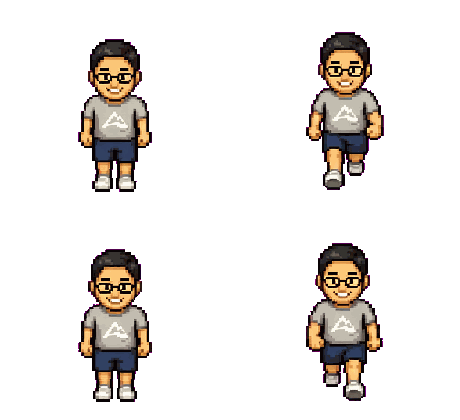
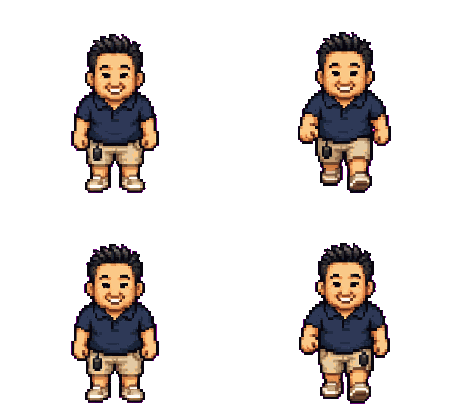
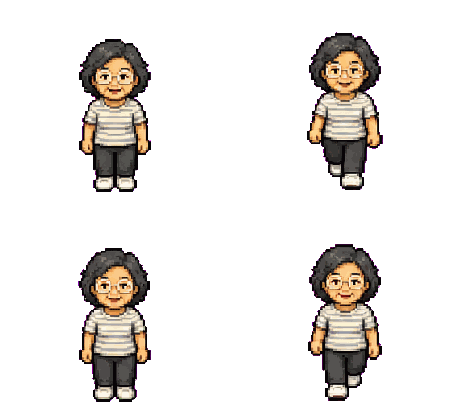

Shown: four real packs — three forged from the founder's own family photos, the fourth from a real customer pack (the same one on the homepage).
Frequently asked questions
Upload one front-facing photo, pay $5, and download a ZIP with the 4-direction walk pack — usually in minutes, no account. It's the fastest path from "my AI can't make a character" to a recognizable sprite walking in your engine.
The sheet is generated by an AI model, but it's finished by deterministic code: the background is truly removed (real alpha, not a painted checkerboard), the feet are aligned to one baseline, and all 16 frames are trued onto a consistent grid before slicing. Packs are QA-checked during beta and refunded if one fails. That finishing step is exactly what raw prompt tools skip — it's the difference between a high-res image pretending to be a sprite and an asset that looks intentional.
Yes. You get a transparent PNG 4×4 sheet, 16 individual frames, 4 direction strips, and 4 looping walk GIFs — engine-agnostic files for Godot, Unity, Phaser, or plain web. The README covers wiring it up, and there's a Godot walkthrough if that's your stack.
Yes — the pack is yours to ship in commercial and non-commercial games, with no per-title or royalty fees. See the commercial use & licensing page for the details.
$5 per character, one-time. No account, no subscription, no credits — and you're refunded if a pack fails QA (handled manually during beta). One photo, one walk pack, one charge.
Put anyone into your game.
$5 · one photo · 4-direction walk pack · no subscription
Make a sprite — $5