RPG Maker sprites from a photo.
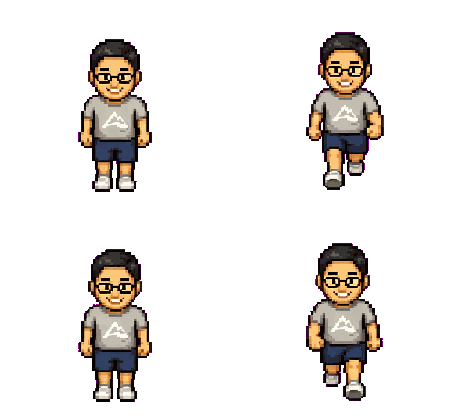
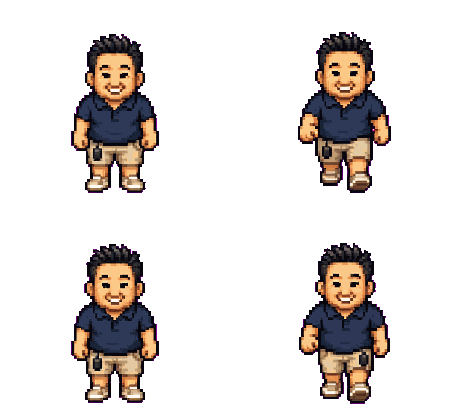
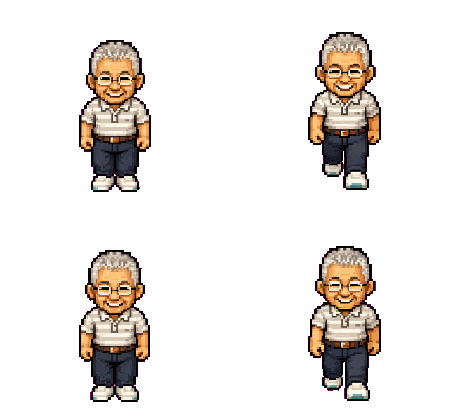
PixelForge's 48px frames match RPG Maker MV/MZ's 48px character cells — so one photo becomes a playable party member. It takes one honest 5-minute rearrange, and the exact recipe is below.
Why this works: 48px is 48px
RPG Maker MV and MZ draw walking characters on a grid of 48×48 cells, three animation frames per direction, four directions per character. PixelForge's pack ships every frame at exactly 48×48 (alongside a 96px set), with the same row order RPG Maker uses: down, left, right, up. That's not a coincidence — it's the classic retro-RPG layout — and it means a photo-forged character drops onto RPG Maker's grid without any rescaling, which is where pixel art usually dies.
The honest part: a 5-minute rearrange
PixelForge outputs a 4×4 sheet (four frames per direction); RPG Maker wants a 3×4 block (three per direction) inside a specially named file. We're not going to pretend it's zero work — it's one small rearrange in any image editor, and here is the exact mapping. The pack's columns are neutral · left-step · neutral · right-step, so for each of the four direction rows:
RPG Maker plays columns 1 → 2 → 3 → 2 in a loop, standing on column 2 when idle — which is exactly the neutral pose. The pack's spare second neutral frame simply goes unused. Assemble the twelve cells on a 144×192 transparent canvas, keep each frame snapped to its 48px cell, and export as $hero.png — the $ prefix marks a single-character sheet, so the editor won't try to read eight characters out of it.
Will it match RPG Maker's art style?
Honest answer: PixelForge sprites are realistically proportioned and fill their 48px cell — they read like the popular “tall sprite” style rather than RTP chibi. Next to default RTP assets the difference is visible; in a project that uses tall sprites (a large share of modern MV/MZ games), they sit right in. For a party of real people — you, your friends, your D&D group — consistency comes free, because every character is forged by the same pipeline. One photo each, and the whole party walks.

What about older makers & face sets?
- MV and MZ — 48px cells, covered above. This is the sweet spot.
- VX/VX Ace and older — those use 32px cells; scaling 48→32 ruins pixel art, so we don't claim support. If you're on Ace, this isn't your tool.
- Face sets and busts — not included. The pack is the walking character; portraits for the message window are a separate art problem (your source photo, cropped, often works surprisingly well).
What's in the $5 pack
One photo, one $5, no subscription — and the same pack still works if you later move the project to Godot or Unity.
Frequently asked questions
Yes — the pack's 48×48 frames match MV/MZ's 48px character cells and use the same down/left/right/up row order. You assemble twelve of the sixteen frames into a 144×192 $hero.png (about 5 minutes; exact recipe on this page).
A standard RPG Maker character file holds eight characters in a 4×2 grid of blocks. The $ prefix tells the engine the file contains a single 3×4 character block instead.
Nothing important: the pack's columns are neutral, left-step, neutral, right-step. RPG Maker wants left-step / neutral / right-step, so the duplicate second neutral is the spare.
No — PixelForge sprites are realistically proportioned (“tall style”), not chibi. They fit naturally in projects using tall sprites; next to pure RTP chibi assets the style difference shows.
We don't claim support: those engines use 32px cells and downscaling 48px art degrades it. MV and MZ (48px) are the supported targets.
Yes — commercial use is included, no royalties. Details on the licensing page.
Put anyone into your game.
$5 · one photo · 4-direction walk pack · no subscription
Make a sprite — $5